Microsoft Copilot in Excel adds reusable skills and live data connectors for finance teams
Published by AINave Editorial • Reviewed by Ramit
Microsoft gave Copilot in Excel a significant update tailored for finance teams. The release adds reusable workflows called Skills, live data connectors from major financial data providers, and granular edit traceability. These features aim to reduce repetitive prompt writing and manual data transfer for anyone building financial spreadsheets at scale.
What happened
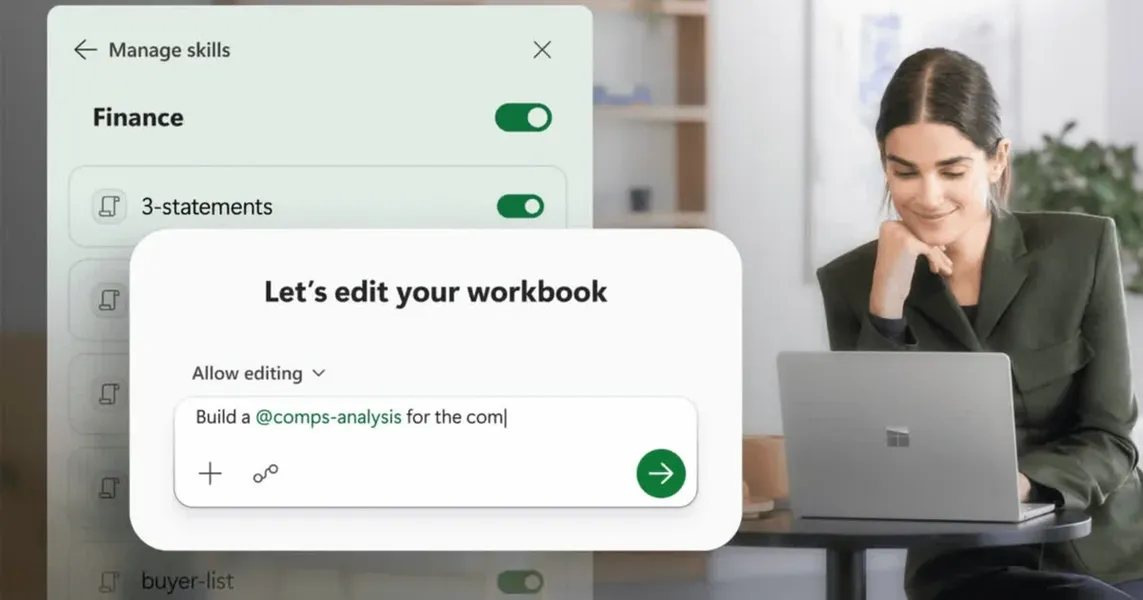
Copilot in Excel now supports reusable financial workflows called Skills. Instead of writing the same detailed prompt each month for tasks like building a DCF, closing the books, or running a variance analysis, you save a SKILL.md file in OneDrive. Copilot then follows those exact steps, formatting, and structure across workbooks without further prompting. You can use Microsoft's prebuilt finance skills, build your own from scratch, or buy partner skills from LSEG, Ramp, Rogo, and Vena through the Microsoft Marketplace later this year.
On the data side, Copilot can now pull live data directly into workbooks through new connectors with CB Insights, Daloopa, FactSet, Morningstar, PitchBook, and S&P Global. These join the existing LSEG and Moody's connectors that shipped in May. This reduces copy-pasting from external reports and grounds analysis in current numbers. However, some connectors require their own separate subscription.
Microsoft also strengthened trustworthiness with a Plan feature in Copilot mode. Before making any edits, Copilot lists the ranges, formulas, and assumptions it plans to touch. After edits, the Show Changes pane clearly tags what Copilot changed versus what a human teammate changed.
The update builds on Excel's existing Agent Mode and follows Microsoft's recent acquisition of finance AI startup Fintool, signaling a deeper push into finance-specific AI. The features are live now for Microsoft 365 Copilot customers on Excel for Web, Windows, and Mac, with custom Skills rolling out to all users over the next month.
Why AI builders should care
If you build AI-powered workflows for finance teams, this update directly targets the two biggest friction points: prompt repetition and data freshness. Skills replace the need for every user to craft the same detailed prompt for recurring tasks. For a builder creating a finance automation layer on top of Excel, Skills act as a template system that can be version-controlled in OneDrive and shared across the organization.
The connector expansion is equally important. Live data from providers like FactSet, S&P Global, and CB Insights means Copilot can work with current market data without manual imports. For builders integrating Excel Copilot into larger pipelines, this reduces the number of ETL steps needed to keep spreadsheets current.
Practical implications
The immediate win is for teams that run the same financial analysis every month, quarter, or year. A Skill for a DCF model or a monthly close process can be created once, stored in OneDrive, and reused by anyone with the right permissions. This cuts the cognitive load of writing prompts and enforces consistency in formatting and structure.
The live data connectors reduce the risk of working with stale numbers, but the subscription requirement for some connectors means teams need to factor in additional costs. The Plan and Show Changes features address the trust problem that has slowed AI adoption in finance: auditors and controllers can see exactly what Copilot touched and how.
Caveats
Some live data connectors require separate subscriptions, so the total cost of using Copilot with premium data is not included in the Microsoft 365 Copilot license. The partner skills via the Microsoft Marketplace are not yet available and may come with their own pricing. Custom Skills are rolling out over the next month, so not every user will see them immediately. The features are limited to Microsoft 365 Copilot subscribers on Excel for Web, Windows, and Mac.
FAQs
Sources
- Microsoft Copilot can now handle more of your finance work in Excel with reusable skills and data connectors
- Microsoft adds reusable skills and finance data connectors to...
- Microsoft Copilot: Your AI companion
- Microsoft’s Office apps are getting more useful Copilot AI... | The Verge
- Microsoft 365 Copilot - Sign in
- Copilot Cowork: From conversation to action across skills...
- Microsoft Copilot Pages Will Change Your Entire Research Workflow
- 15 Microsoft 365 Copilot Tricks to Speed up Chat, Email, Data & Slides for Busy Teams
- Microsoft Copilot Cheat Sheet: A Complete Guide to Microsoft’s AI
- Microsoft Expands Copilot's Agentic Capabilities in Office, Unveils AI Agent Builder Certification
- 14 Ways to Use Microsoft Copilot More Effectively at Work
- Finance in Microsoft 365 Copilot is now generally available
- Finance agents in Microsoft 365 - Microsoft Excel experiences
- Finance Solution GA: ERP Data in Excel and Outlook with Microsoft 365 ...
- Save 10 Hours per Week by Mastering Microsoft Copilot