Gemini Spark in Chrome Turns Browser Tasks Into Supervised AI Workflows
Published by AINave Editorial • Reviewed by Ramit
Gemini Spark is now integrated into Chrome as a browser-based AI agent that can plan and execute multi-site tasks. For builders, the meaningful change is not another chat panel. It is an assistant that can interact with the web, while keeping a human in the loop for consequential actions.
Gemini Spark Chrome moves from advice to execution
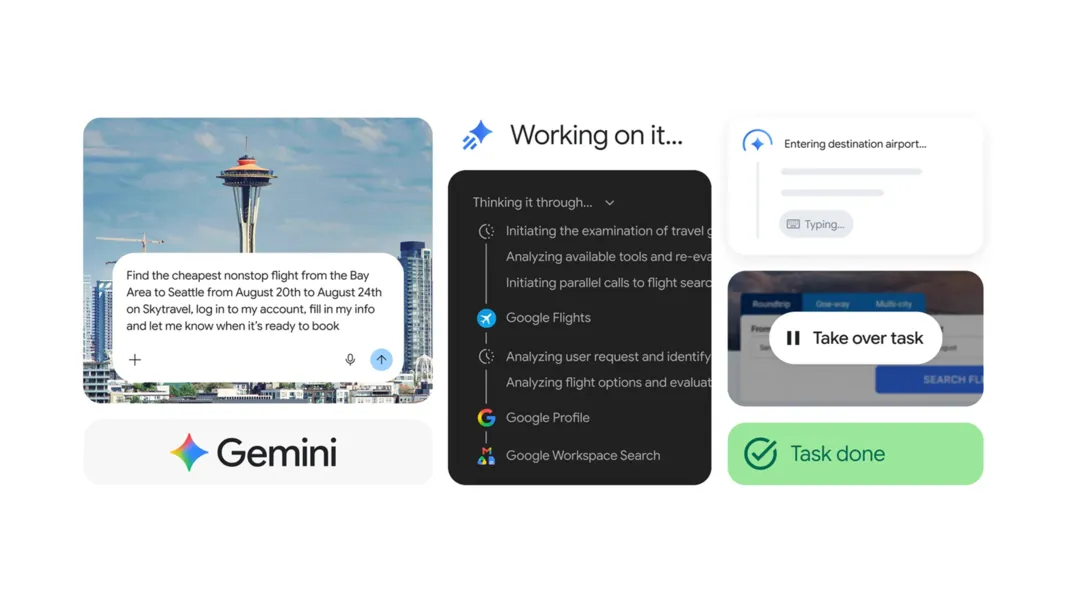
Standard assistants generally tell users which sites to visit and what to click. Spark can browse those sites itself. It shows a proposed plan before starting, then works through the browser and can continue longer-running tasks in the background, according to the hands-on report.
That makes the Chrome AI assistant closer to an operator than a search feature. The distinction matters for product teams building AI agents: the useful unit is no longer a single answer, but a workflow with state, tool access, intermediate decisions, and approval checkpoints.
What the browser agent can actually do
The reported tests covered three practical categories of online task automation with Gemini Spark. First, it performed price comparison with Gemini Spark by checking a 65-inch TV across Amazon, Best Buy, Costco, and Walmart, calculating the final price after discounts, and adding a preferred item to a cart. It stopped before payment.
In another workflow, Spark planned a family day out by checking opening hours, travel times, restaurant availability, and museum tickets. It reserved a restaurant and prepared the ticket purchase, then waited for consent before completing the sensitive steps.
It also filled out a library card application using saved contact and address information. Spark reached the final submission screen but did not submit the form without approval. These examples show where automatic browsing is useful: repetitive navigation, data gathering, comparison, and form completion. They do not show that the agent can safely handle every website or every type of form.
The practical lesson for AI builders
The strongest design pattern here is supervised browser automation. Let the agent handle low-risk navigation and preparation, but require explicit user consent before money moves, personal data is submitted, or a booking becomes binding.
That separation can reduce review burden without removing accountability. A shopping assistant, travel planner, or operations tool can do the slow work first and present a clear point of commitment. For builders, the approval step should show the exact item, destination, price, entered data, or reservation details, rather than asking for a vague “continue.”
The integration also highlights deployment controls. Access requires the latest Chrome on Windows or macOS, a personal Google account, a Google AI Pro or Google AI Ultra subscription, and Safe Browsing set to Standard Protection or Enhanced Protection, based on the reported setup. The official Gemini in Chrome page describes Spark as rolling out first in preview to Pro and Ultra subscribers in the United States, so teams should not assume universal access or stable availability.
Why partial automation is still the right boundary
Spark is more capable than a Chrome assistant that only summarizes open tabs. Google describes Gemini in Chrome as using browser context to provide relevant help, while Spark adds the ability to act on that context. The official Chrome overview distinguishes browser assistance from the Spark preview rollout.
But the agent remains a workflow component, not an autonomous replacement for review. Web pages change, discounts can be misunderstood, forms can contain ambiguous fields, and a plausible itinerary can still be impractical. The source evidence is based on hands-on examples rather than a published benchmark, so it supports a narrow conclusion: Spark can remove substantial clicking and typing in selected workflows, but its reliability across arbitrary sites remains unclear.
For teams evaluating an AI agent for browsing and tasks, the decision rule is straightforward. Use this pattern where preparation is repetitive and the final action is easy for a person to inspect. Keep sensitive submissions, purchases, and irreversible changes behind explicit
Sources
- I tried Gemini Spark in Chrome and it's the perfect AI for handling all the boring bits online
- Gemini in Chrome — AI assistance, right in your browser
- Gemini Spark: What Google's 24/7 AI Agent Means for... | MyClaw.ai
- Gemini Spark Auto Browse: Requirements, Limits & Setup
- AI in Chrome: help right where you need it
- Gemini’s new AI agent is about as good as Google’s demo
- I Gave Gemini Spark Access to My Life. Then It Friend-Zoned My Boyfriend
- I put Google’s 24/7 AI assistant Gemini Spark to work, and it’s actually pretty useful
- Google unveils Gemini Spark — a '24/7 personal AI agent'
- Gemini Spark is the most impressive and terrifying AI experience I’ve had yet
- Google News - Google integrates Gemini Spark AI agent with Chrome...
- Google's Gemini Spark AI agent can now browse the web and run...
- Gemini Spark: Google’s 24/7 Cloud AI Agent Now Executes Tasks in Third-Party Apps