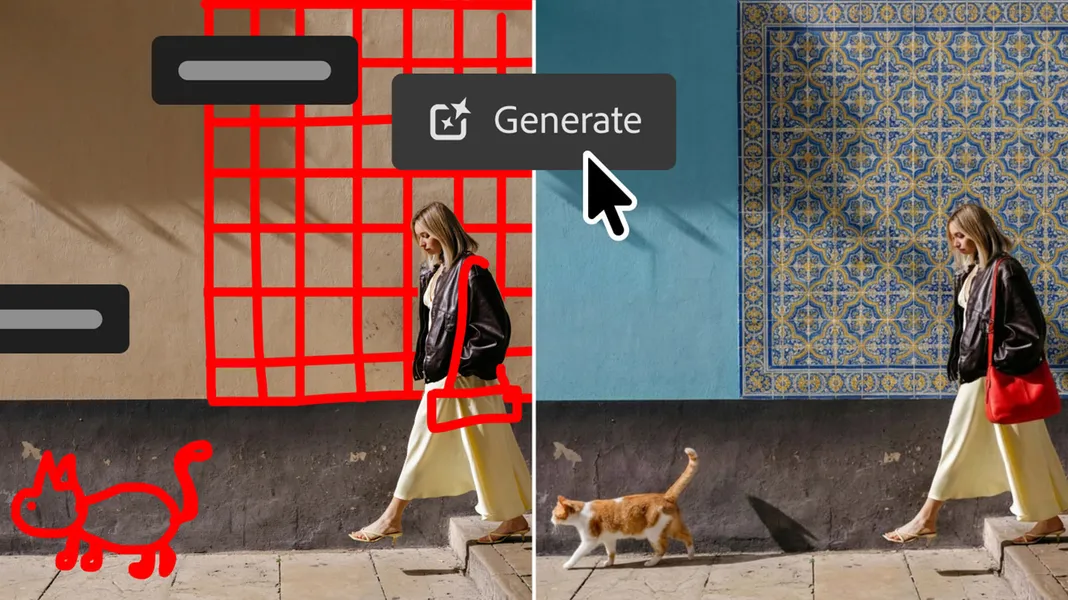
Photoshop Markup Feature Lets You Draw Edits Directly on Images
Published by AINave Editorial • Reviewed by Ramit
Adobe's latest Photoshop update introduces a Markup feature that lets you draw directly on an image to guide AI edits, alongside Lightroom-style lighting controls and a new AI Assisted Editor. For builders shipping AI-powered creative tools, this is a clear example of how non-destructive, prompt-and-directive AI can be embedded into professional workflows without leaving the host application.
Markup: Draw to Direct AI Edits
The Markup feature works in conjunction with text prompts: you sketch arrows, recolor areas, or draw rough shapes to indicate changes, and the AI (powered by Firefly Image 5) fills in photorealistic elements. In one example, a roughly drawn cat and wall tiles are transformed into realistic additions. The Verge describes it as a way to show Photoshop's AI assistant what you'd like to change without relying solely on text. This reduces ambiguity in generative edits, especially for spatial changes like repositioning objects or adding new elements.
Light Adjustment Layer: RAW-Quality Controls in Photoshop
A long-requested feature, the Light Adjustment Layer brings exposure, contrast, highlights, shadows, whites, and blacks into a non-destructive layer. Adobe claims it delivers "camera raw-level results" within Photoshop's layers workflow, meaning photographers can make RAW-quality edits without switching to Lightroom. For teams building image processing pipelines, this consolidation reduces context switching and keeps edits in a single layer stack.
AI Assisted Editor and Other Tools
The AI Assisted Editor (beta) groups Prompt to Edit, Remove Background, Generative Expand, Remove Tool, Generative Fill, Generative Upscale, and AI Markup into a dedicated interface with a natural-language prompt bar. You can continue using these tools in the regular pro interface as well. Additionally, Instruct Edit with Masks (Firefly Image 5) lets you describe edits after masking, protecting unmasked areas. Dynamic Text, Shapes and Paths extends Dynamic Text to custom shapes/paths, and a Stock Panel Integration puts over 900 million Adobe Stock assets in a dockable panel.
What This Means for AI Builders
For product teams designing AI-assisted creative tools, the key UX pattern is combining freeform drawing (Markup) with text prompts to reduce ambiguity in generative edits. The non-destructive layer approach (Light Adjustment Layer) shows how to integrate AI without breaking existing workflows. The AI Assisted Editor is a beta experiment in consolidating AI tools into a single prompt-driven interface, which could inform how other apps design AI interactions. The update also demonstrates how to bundle AI features with traditional controls (lighting, text, stock) to keep users inside one application.
Caveats and Availability
All features are available in the latest Photoshop update on Creative Cloud. Markup is also available on Photoshop on the web (beta). The AI Assisted Editor is in beta, so UX and reliability may change. Evidence comes from product announcements and support pages; precise feature behavior may vary by platform and update stage. Builders should test with their own workflows before relying on these tools in production pipelines.
FAQs
Sources
- Photoshop's new 'Markup' feature lets you draw on images to show what you want
- Photoshop's new 'markup' feature lets you draw on images to show what ...
- Enhance images with AI markup in Photoshop on the web | Photoshop
- Prompt to Edit, now with Markup and Dynamic Layer (Beta)
- Adobe is adding more AI to Photoshop - The Verge
- Adobe Photoshop: New AI Assisted Editor Tools — The AI Chronicle
- Photoshop's New 'Markup' Feature Lets You Draw On Images To Show What You Want
- Photoshop’s new AI Assisted Editor offers a prompt-based editing option
- Photoshop's New 'Markup' Feature Lets You Draw On Images To...
- LOOMIS METHOD for Portrait Drawing - NOT what you... - YouTube
- How to Markup, Write, & Draw on Photos with iPhone or... - OS X Daily
- Official Adobe Photoshop | Free Trial and Online Photo & Design App
- I only had ONE HOUR to make this! (photoshop) | ep. 4 - YouTube
- Adobe Photoshop suma AI Assisted Editor y markup visual – El...