OpenAI Computer History on macOS: What Agent Memory Means for AI Builders
Published by AINave Editorial • Reviewed by Ramit
OpenAI launched Computer History, a Mac-only feature that records your app switches and in-app activity every 10 minutes into Markdown memory files. For AI builders, this is the closest thing to persistent agent memory without screenshots or audio. But the privacy trade-offs are real.
How Computer History Works
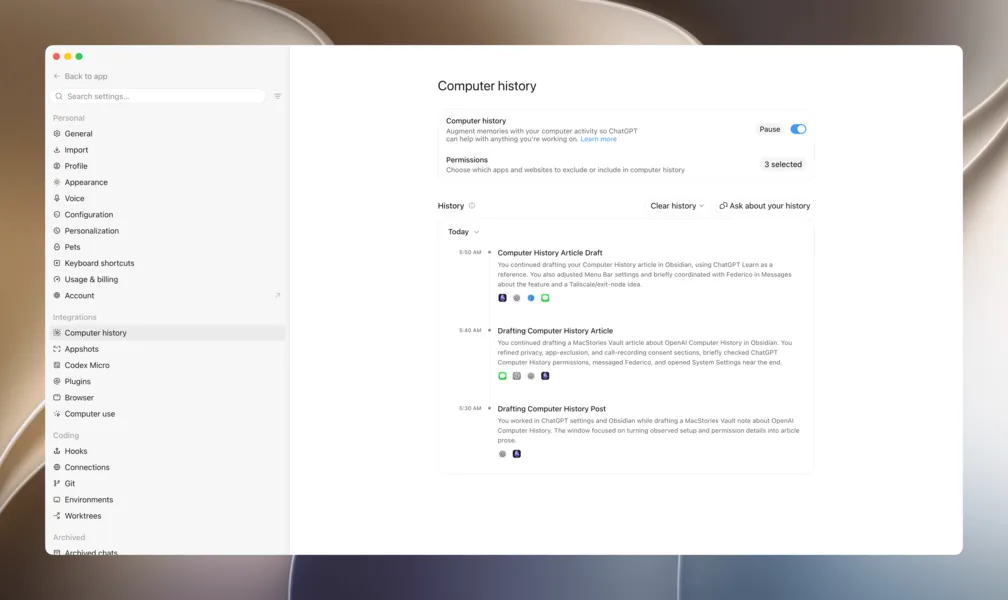
Computer History is an opt-in feature for Pro, Business, and Enterprise subscribers that creates continuity for ChatGPT and Codex by converting your Mac actions into Markdown memory files with YAML front matter. Every 10 minutes, it generates a timestamped summary of which apps you used and what you did in them. These files are stored locally on your Mac.
The underlying event files are deleted after 48 hours, and the memory files are generated in ephemeral Codex sessions. When you ask a question in ChatGPT or Codex that calls on those memory files, the data is transmitted to OpenAI as part of the prompt. You can pause, clear, or restrict Computer History to specific apps or websites from the Integrations section of the desktop app settings.
This is distinct from Chronicle, OpenAI's retired research preview that relied on screenshots. Computer History records interaction events only, not screenshots, audio, or private web browsing sessions.
Why This Matters for AI Builders
For anyone building AI agents or workflows, the biggest win is eliminating the Groundhog Day problem. Every thread currently requires re-explaining context. Computer History automates that by giving ChatGPT and Codex a running log of your work. Early testing shows it can answer questions like "What have I been working on today?" with accurate summaries.
More interesting is the potential to turn observed workflows into reusable skills. OpenAI's documentation suggests you can say "I just did X. Turn it into a skill" and have the agent create an automation from your demonstrated actions. This reduces the friction of building automations because you don't have to stop and configure them manually.
Compared to Siri on macOS Golden Gate, Computer History handles tool use better. When asked to send a draft via Messages, Codex used Computer Use to find the file and drop it into the thread, while Siri pasted raw Markdown with line breaks.
Privacy and Data Flow: What You Need to Know
The privacy model is straightforward but requires trust. Event files stay local for 48 hours, and memory generation happens in ephemeral sessions. However, when you use those memories as context, the data leaves your machine. OpenAI's documentation states that memory files are used as context for prompts, transmitting the data as part of the request.
You can exclude sensitive apps like password managers and keychain access. The feature also prompts you to pause during video or audio calls to avoid recording others without consent. But ultimately, if you're not comfortable with your Mac activity being used as context, you shouldn't enable Computer History.
Caveats and Unknowns
Computer History is brand new, and its long-term reliability is unproven. OpenAI hasn't disclosed the token cost of generating these summaries, which could add up for heavy users. The feature is Mac-only, so Windows and web users are left out. And while the skill-creation promise is compelling, it remains to be seen how well it works in practice beyond contrived examples.
For AI builders evaluating this, the key question is whether the convenience of automatic context outweighs the privacy implications. For teams building internal tools or personal agents, Computer History offers a template for how local activity can feed into agent memory without screenshots.
FAQs
Sources
- Hands-On with Computer History: OpenAI’s Take on Agent Memory
- OpenAI’s Computer History Turns Mac Activity Into ChatGPT Memory
- ChatGPT can now remember what you did on your Mac — without screenshots - The New Stack
- OpenAI ditches Recall-style screenshot surveillance for friendly keylogging
- ChatGPT gets "Computer History" memory
- Agent memory - OpenAI Agents SDK
- OpenAI Agents Forget Everything Between Runs. Here's the Fix. | Hindsight
- Hands-On with Computer History: OpenAI’s Take on Agent Memory
- OpenAI Computer History: How It Works and Key Risks
- OpenAI | Research & Deployment
- ChatGPT Work Brings Desktop Automation, Memory and Governance...
- AI swarms are starting to pose indirect takeover risk — LessWrong