techspot.com
DoomPaint Uses a Clipboard Trick to Render Doom in Microsoft Paint
Tech News••
3 min read
Published by AINave Editorial • Reviewed by Ramit
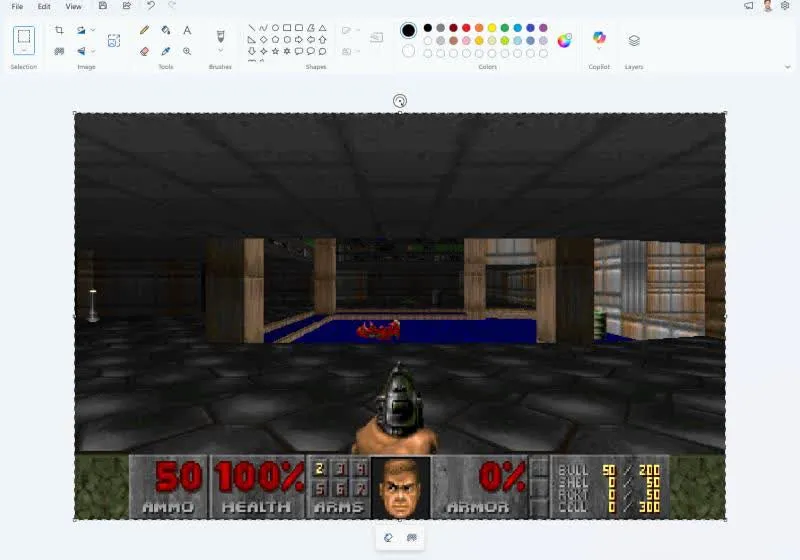
TL;DRDoomPaint does not make Microsoft Paint run Doom directly. Mark Russinovich’s project uses ViZDoom to render the game headlessly, then turns Paint into a frame-by-frame display through the Windows clipboard.
DoomPaint is a technical demonstration by Microsoft Azure CTO Mark Russinovich that renders the original Doom shareware through ViZDoom and displays each frame inside Microsoft Paint. The practical takeaway for builders is less about gaming and more about integration: an existing desktop application can become a surprisingly capable output surface when the rendering and input layers are separated. DoomPaint uses ViZDoom as the headless game engine and Microsoft Paint as the display canvas.\n\n## Paint is the display layer, not the game engine\n\nDoomPaint does not execute Doom inside Paint. ViZDoom, a ZDoom-based platform originally designed for AI research, runs the engine and produces rendered frames. DoomPaint then places each frame on the Windows clipboard as a bitmap and pastes it into Paint as a real document edit.\n\nThat distinction matters. Paint computes nothing about the game world. It is effectively being used as a monitor with editing features attached. A low-level keyboard hook captures movement, strafing, shooting, and door-opening controls while Paint stays active, so the player can interact with the engine without sending normal input into the drawing application.\n\n## The clipboard trick needed synchronization\n\nThe interesting engineering problem was not copying an image once. Repeatedly replacing clipboard contents could cause Paint to read incomplete or outdated frame data before the next frame was ready. DoomPaint addresses that race condition with a single OLE data object whose supplied image bytes are updated over time.\n\nPaint signals when it has read the current data, allowing the next frame to become available. This is a useful pattern for builders working with existing applications: the integration boundary is not necessarily an API. Clipboard formats, document edits, focus management, and synchronization behavior can form a workable, if awkward, protocol.\n\n## What DoomPaint supports\n\nThe project loads the genuine
DOOM1.WAD for Episode One. For maps not included in that shareware release, it uses BSD-licensed Freedoom WADs. The engine runs on its own thread at Doom’s native 35 Hz tic rate, while output resolution ranges from 320x200 to 640x480. Actual performance depends on the computer and selected resolution, and can drop to what Russinovich describes as “spreadsheet-tier.”\n\nBecause every frame becomes a Paint edit, Ctrl+Z can move backward through the frame history. File > Save can also produce a PNG from the current canvas. The project includes Episode One music converted from MUS to MIDI on the fly, along with engine-provided sound effects.\n\n## A useful demo, not a practical game port\n\nDoomPaint is best understood as a reproducible demonstration of portability and tool composition, not as a better way to play Doom. It starts ViZDoom directly in a map, without title screens, demos, or in-game menus, and its frame-by-frame path through Paint adds overhead and latency.\n\nFor AI builders, the stronger lesson is architectural. A model, simulator, or renderer can remain responsible for computation while a familiar application handles presentation, persistence, or review. That approach may be valuable for prototypes and demonstrations when rewriting a full interface is not worth the effort. It also brings obvious operational constraints: focus can be fragile, throughput is limited, and undocumented application behavior can become part of the system.\n\nDoomPaint is available on GitHub under the MIT license, with a batch script that creates a Python virtual environment and installs dependencies. The project is compelling precisely because it exposes the boundary between computation and presentation. Paint is not running Doom. It is proving that a surprisingly small integration layer can make an unrelated application look like a game console.