Photoshop Relight adds AI lighting, with a fidelity trade-off
Published by AINave Editorial
Adobe’s Photoshop Relight puts adjustable AI lighting in the desktop beta, letting users reposition artificial lights after a shoot. The appeal is speed: early users describe it as a possible shortcut or starting point for manual light painting. But reported portrait results also raise a practical concern: the tool can change more than the lighting.
Lights you can move after the shoot
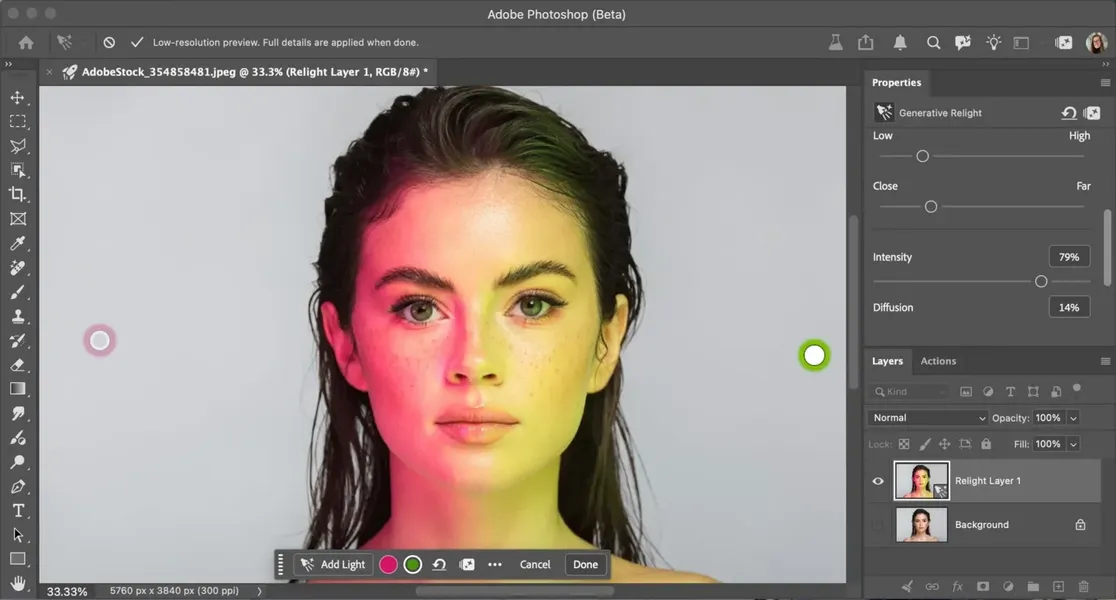
Relight adds a separate, non-destructive layer, so the original image pixels remain untouched. Users can place up to three artificial lights and adjust each one’s position, intensity, colour and diffusion, with changes shown in real time. Switch all the added lights off and the ambient or original light remains, according to Creative Bloq’s account of the feature.
The workflow is built around changing the setup rather than painting light into the image by hand. In the beta, users open an image and choose Layer > New Relight layer. They can move, add, hide or delete lights before selecting Done to generate the result at the input image’s full resolution. That separation gives users room to adjust the lighting before committing to the generated output, though non-destructive controls do not guarantee that the result will preserve every visual detail.
The trade-off is fidelity, not just lighting style
Early reactions are divided. Some users quoted by Creative Bloq see Relight as a way to speed up lighting work or establish a base for further manual editing. Others describe soft, unnatural results, with smoothed textures that can make portraits look more like 3D characters. The article also reports apparent unintended changes to people’s appearance, such as altered facial details.
That matters because relighting is often expected to change how light falls while keeping the photographed person recognizably the same. Creative Bloq describes Relight as removing the image’s existing lighting and generating new lighting, so the output is not simply a conventional adjustment to brightness or colour. The early feedback suggests the generated result can affect texture and appearance as well. Since the feature had only just launched in beta, those reactions are early reports, not a measure of how it performs across images. The article suggests blending the result with the original to restore texture, but does not establish how reliably that resolves the issue.
Each finished render costs credits
There is also a usage cost to account for: the article says pressing Done consumes 30 credits for each final render. That makes the distinction between adjusting lights and generating the full-resolution result important. Users can refine the setup before rendering, but teams evaluating the feature should consider both the output’s fidelity and the credits used for each completed result.
Relight looks most useful as a way to explore or establish lighting quickly, rather than as a guaranteed replacement for careful retouching. Whether it earns a place in a final portrait workflow depends on how often its generated lighting preserves the details that the image needs to retain.