ChatGPT Computer History on macOS: What It Does and the Privacy Trade-Offs
Published by AINave Editorial • Reviewed by Ramit
OpenAI has introduced Computer History for ChatGPT on macOS, a feature that records your clicks, keystrokes, app switches, and other interaction events to build a searchable timeline of your activity. The goal is to let ChatGPT answer questions like "What was I working on before my break?" or detect repeatable workflows for automation. But for AI builders evaluating this feature, the real story is the trade-off between context-aware assistance and a privacy model that sends your activity data to OpenAI servers.
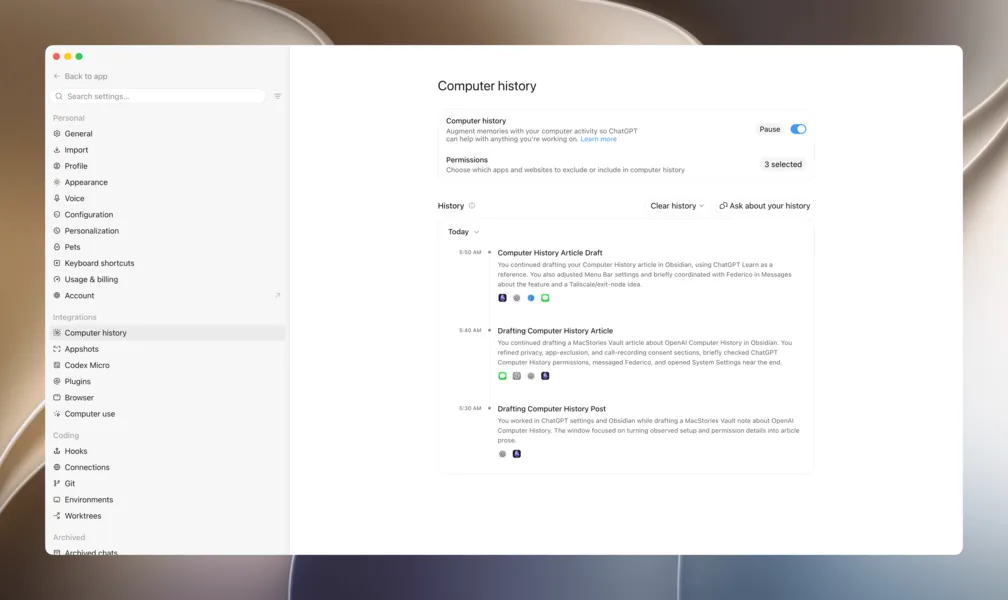
Computer History does not take screenshots or record audio. It captures interaction events through macOS accessibility processes. Periodically, ChatGPT turns that event stream into text summaries and local memory files, and it builds a browsable timeline in Settings. You can ask ChatGPT about recent work, find lost documents, or even get suggestions for automating frequent tasks.
The feature is opt-in by default. You choose which apps and websites to track, pause collection from the menu bar, or exclude private browsing entirely. You can also wipe the last 10 minutes or your full history. But despite those controls, the underlying data handling differs sharply from Apple's on-device privacy philosophy.
Why the server-side processing matters for builders
Unlike Apple Intelligence, which processes similar signals on-device or via Private Cloud Compute, Computer History sends raw activity data to OpenAI servers to generate memory summaries. OpenAI says it deletes the raw files after 48 hours and does not use them for training. However, the company also notes that if you consent to training on your ChatGPT chat data, future chats that reference a memory may be used. This creates a nuanced trust model: data is not used for training by default, but the processing still happens remotely.
For AI builders designing similar features, the key lesson is that users will weigh convenience against data exposure. Apple's approach keeps everything on-device; OpenAI's approach uses cloud processing in exchange for richer memory generation. Both are valid architectural choices, but they require explicit user consent and clear documentation.
Practical controls and implications for product design
Computer History offers several controls that should inform how you build memory or activity logging into your own AI products:
- Granular app/site scoping: Users can include only certain apps or exclude specific ones. This limits the blast radius of any data leak.
- Pause and wipe: Collection can be paused instantly from the menu bar, and users can delete history by time range or individual entries.
- No screen capture: The feature avoids the privacy and legal complexity of screenshot-based tracking, reducing the surface for sensitive data exposure.
These design patterns give users a reasonable degree of agency, but they don't eliminate the security risks OpenAI explicitly warns about.
Security caveats you shouldn't ignore
OpenAI acknowledges that Computer History increases your risk of prompt injection attacks, because ChatGPT may see and follow malicious instructions embedded in the apps and websites it tracks. The stored data is not end-to-end encrypted, meaning any program running as your macOS user could potentially access it.
These aren't hypothetical risks. If you are building a feature that records user activity, you need to consider whether the value of context-aware assistance justifies the security and privacy exposure. For now, Computer History is available only in the US to Pro and Business/Enterprise users. EU and UK availability is not confirmed, likely due to regulatory concerns.
For AI builders, the bigger takeaway is that memory features are becoming table stakes for assistants, but the implementation details around data handling, user control, and security will ultimately determine whether users trust them enough to turn them on.
Sources
- ChatGPT Can Now Remember Actions You Takr on Your Mac
- ChatGPT just learned to watch everything you do on your Mac
- ChatGPT: Chat, Work, Create & Code with AI
- GPT Image 2 (ChatGPT Images 2.0): Free Online, No Sign-up
- Chat GPT Can Now SEE and HEAR You | NEW ERA of Artificial...
- OpenAI | Research & Deployment
- It was another busy week in Artificial Intelligence. Here are a couple
- ChatGPT will not suffer from memory loss; it will now remember all your conversations for free
- ChatGPT can now finish what you started, and that’s a much bigger deal than it sounds
- ChatGPT can now control your whole desktop. I tested it with chess
- ChatGPT gets big memory boost, OpenAI says it will remember everything about you now
- I found 3 ChatGPT features that turned out to be way more useful than I expected
- ChatGPT | OpenAI Help Center
- 15 Mind-Blowing Ways to Use ChatGPT Daily
- ChatAI - GPT Chat Online & Free
- JanitorAI
- ChatGPT just got a feature you'll actually use every day, but you need to pay for it