The short version
- The modes
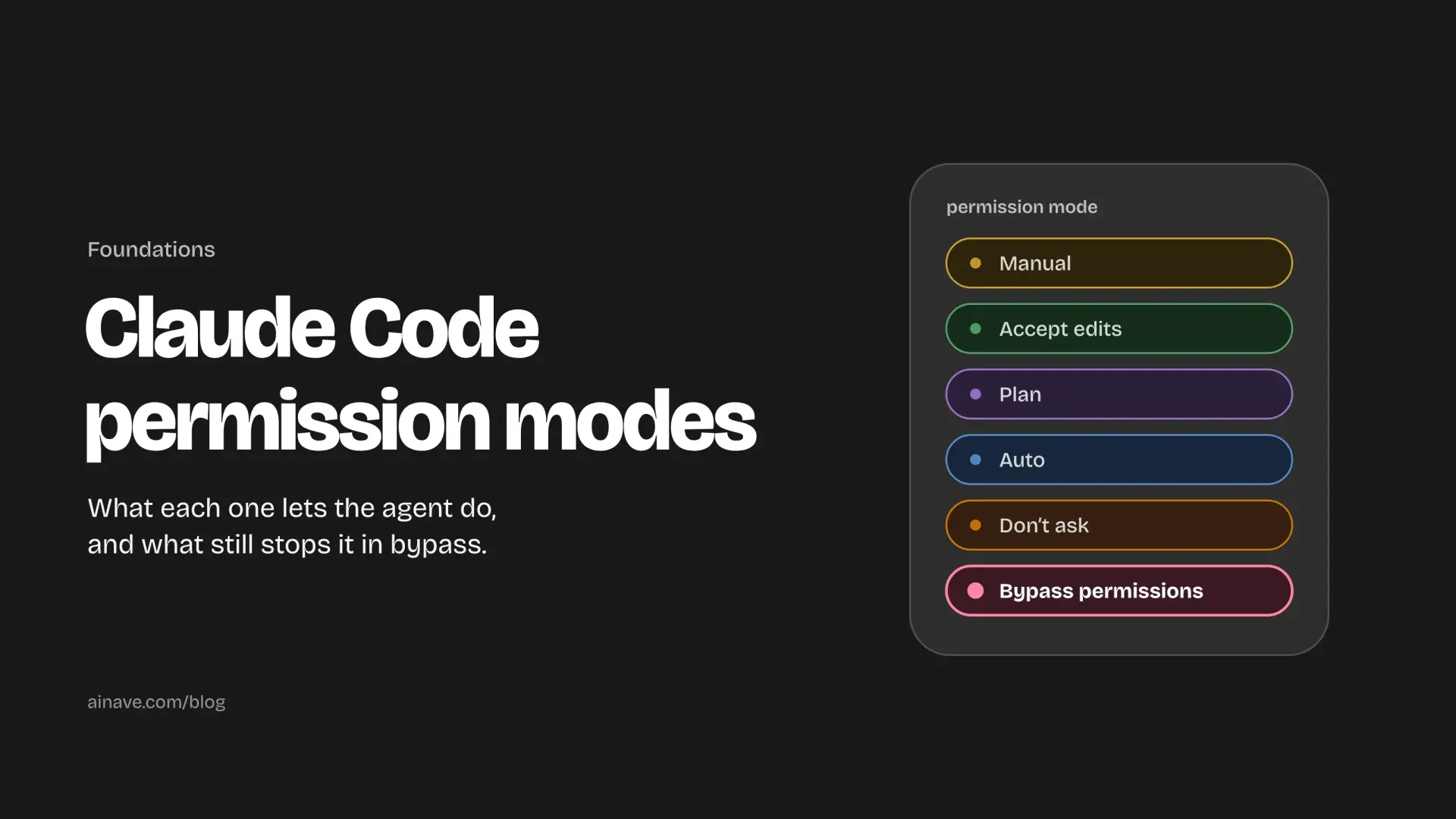
- 6 of them: Manual, Accept edits, Plan, Auto, Don't ask and Bypass permissions.
- The default
- New terminal and VS Code sessions have started in auto mode since late September 2026.
- Bypass keeps
- Deny rules, ask rules, PreToolUse hooks that deny, the dangerous rm check and a refusal to run as root.
- Bypass drops
- Allow rules, protected paths and any defense against prompt injection.
- Auto mode
- A classifier model decides. Anthropic measured 0.4% of safe actions blocked and 17% of overeager ones let through.
- What matters more
- What the agent can reach. Read-only credentials and git protect you in every mode.
Tools in this post
 Claude Code
So, Anthropic says 1 in 4 interactive Claude Code sessions starts in bypass permissions mode. That is the mode where Claude stops asking you before it does things. I am one of those people. I have tried all 6 Claude Code permission modes. I use 2. Bypass most of the time, auto mode sometimes. Nothing else.
Now see, Anthropic's own docs say don't do this. Bypass is for containers and VMs, they say. I run it on my own machine. So for this post we went through the current docs, the changelog and the public incident reports with one question. What does each mode actually let the agent do? And what still stops it when the prompts are off?
Why I run bypass
So here is how I work. First I discuss everything with Claude. What to build, how to build it, what can go wrong. Once that is done, I don't want it to stop and ask me anything. Just finish the work. The other modes don't let that happen. They interrupt.
And see, it has never broken anything for me. But that is not because bypass is safe. The point is, Claude only has read-only access to my production databases. The rest of its access is limited too, so it cannot delete anything by mistake. That matters more than the mode. I will come back to it.

The 6 Claude Code permission modes
A permission mode is nothing but a setting that decides one thing. Which actions can Claude run without asking you first? There are 6.
3 things the older guides miss:
- You start in auto now. Since late September 2026 (v2.1.283 and v2.1.284), a new terminal or VS Code session opens in auto mode, on every plan, unless your admin turned it off. Headless
claude -pruns and the Agent SDK normally start in Manual. - Manual is the old "default". Only the label changed, in v2.1.200 on July 3, 2026. The setting value is still
default. And VS Code calls Accept edits "Edit automatically". - A repo cannot put you in bypass. Let's suppose you clone a project and its
.claude/settings.jsonsays start inautoorbypassPermissions. Claude Code ignores it. Only your own settings, managed settings or a flag can turn those on.
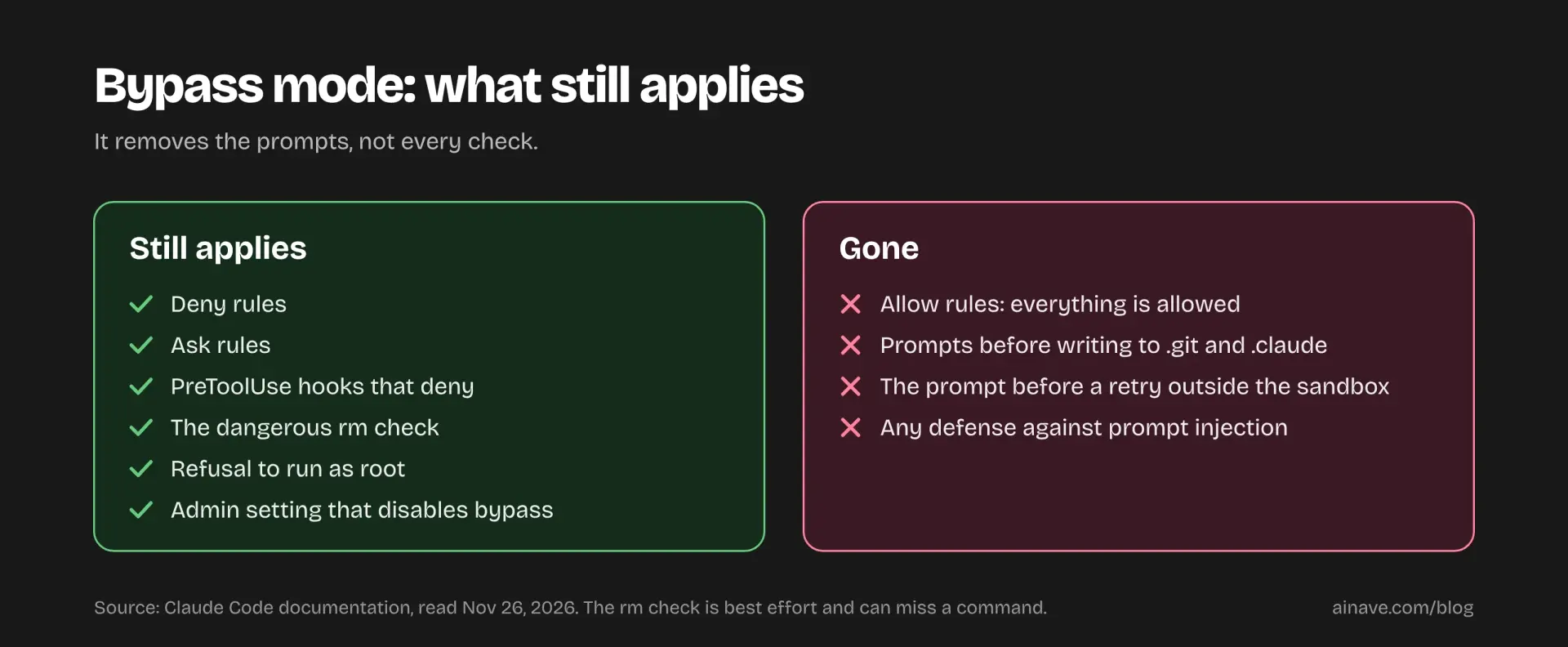
What still stops Claude in bypass mode
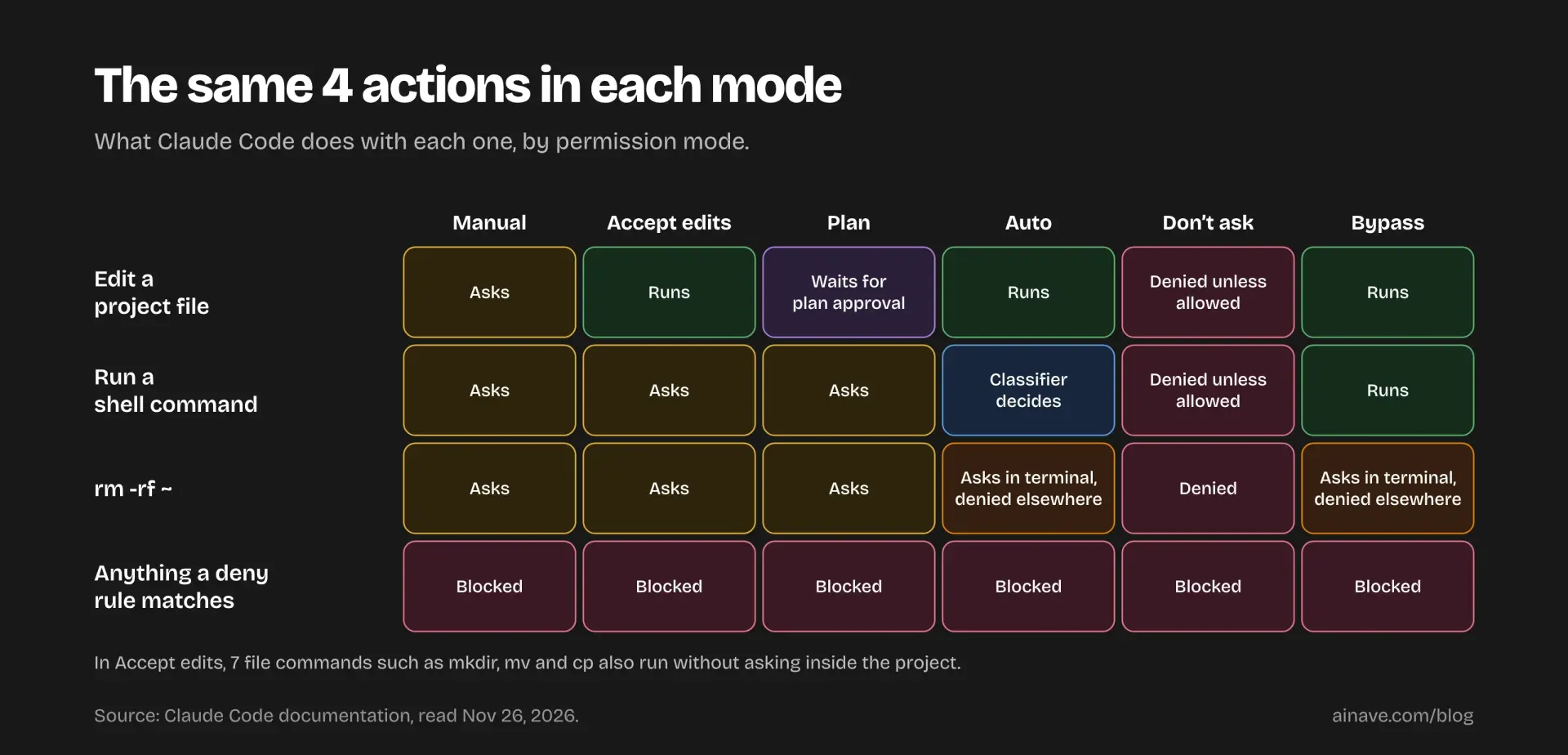
A lot of people think bypass means nothing is checked. That is not completely true. The docs have a list of actions that no mode approves on its own, and a few more limits that apply to bypass itself. We could not find all of them in one place. So here they are.
- Deny rules. A deny rule is a line in your settings that says never do this. It blocks in every mode, bypass included. One exception in the docs: a mod you installed yourself, on a personal setup, can approve a call that a deny rule refuses.
- Ask rules. If you wrote an explicit ask rule for a tool, it still asks.
- PreToolUse hooks. A hook is your own script that runs before a tool call. If it returns deny, the call is blocked. The mode does not matter.
- The dangerous
rmcheck. Takerm -rf ~, which deletes your whole home folder. If Claude Code recognizes a removal like that, it does not run silently. In the terminal you get a prompt with a 2-minute countdown. In the desktop app and VS Code it is denied at once since v2.1.309 (October 22, 2026), unless a PermissionRequest hook allows it. - Root. On Linux and macOS, bypass refuses to start as root or under sudo, unless it is inside a recognized sandbox.
- Your admin. Set
permissions.disableBypassPermissionsModeto"disable"and the mode is gone. In managed settings, users cannot override it.
One more. You cannot switch into bypass in the middle of a session. The session has to start with it enabled.
Now the other side. This is what you give up:
- Allow rules mean nothing. Everything is allowed anyway.
- Protected paths open up. Writes to
.git,.claudeand similar paths go through without a prompt. - The sandbox gets loose. If it is on, Claude can retry a command outside it without asking. And connections to hosts that are not on your allowlist go through without a prompt.
- The
rmcheck is best effort. The docs say it can miss a command. A missed command just runs. - Prompt injection is your problem. The docs warn that bypass does nothing to defend against it.
And Anthropic has not changed its position. The permissions page says: "Only use this mode in isolated environments like containers or VMs".
A few deny rules that survive bypass
Deny rules still work in bypass. So the cheapest protection for a bypass user is a short list in ~/.claude/settings.json:
{
  "permissions": {
    "deny": [
      "Bash(git push --force *)",
      "Bash(terraform destroy *)",
      "Read(./.env)",
      "Read(./secrets/**)"
    ]
  }
}
But see, this is a seatbelt. It is not a wall. A Bash rule matches the text of the command Claude writes. So git push --force is caught, and the same push written in another way may not be. The docs are clear on this. A deny rule covers the form Claude usually writes. It is no guarantee.
Auto mode, the one Anthropic wants you to use
So what is auto mode? It is nothing but a second model checking the first one. A separate classifier model looks at what Claude wants to do and says yes or no, in your place.
Reads and edits inside the project skip it. For everything else, the classifier sees your messages, the tool call that is waiting, and your CLAUDE.md. It does not see tool results. So if some file or web page has hostile text in it, that text cannot talk to the classifier directly.
By default it blocks things like these:
- Downloading and running code, such as
curl | bash - Sending sensitive data to an outside endpoint
- Production deploys and migrations, and
terraform destroy - Force pushes,
git reset --hardand similar discards - Granting IAM or repository permissions
- Starting another agent with
--dangerously-skip-permissions
When it blocks, Claude is told why and it tries another way. After 3 blocks in a row, or 20 in one session, auto mode pauses and you are back to prompts.
This is the interruption I was talking about. In auto mode, if you tell Claude "don't push", that works as a boundary. But it is not stored as a rule, and it can get lost when the context is compacted. And agreeing on a plan does not approve everything in that plan. Let's suppose the plan ends with a force push of a rebased branch. Auto mode can still stop there. Bypass doesn't.
Anthropic has published how good the classifier is. All of these are its own numbers:
Read that 17% properly. About 1 in 6 of the overeager actions got through, in Anthropic's own test. The docs don't hide it either: "Auto mode reduces permission prompts but does not guarantee safety."
On cost. Classifier overhead stopped counting against Pro, Max, Ultra and Team usage on August 7, 2026. Since v2.1.278 in September, API, Enterprise and cloud-provider sessions use a server-side classifier by default, and that is not charged either. You pay only if a session falls back to the local classifier.
The sandbox is a separate switch
Claude Code also has a sandbox. A sandbox is nothing but a fence that the operating system puts around a command. It is off by default. It uses Seatbelt on macOS and bubblewrap on Linux and WSL2. And it wraps shell commands only. Claude's own file tools, MCP servers and hooks run outside it.
When it is on, shell commands can write only to the project, the directories you added and a temp directory. Network traffic goes through an allowlist, and that list starts empty. Reads are not restricted by default. So files like ~/.ssh stay readable unless you deny them.
The sandbox works with any mode. But bypass loosens it in 2 ways. A retry outside the sandbox runs without a prompt, unless you set allowUnsandboxedCommands to false. And a connection to a host that is not on your allowlist is allowed without a prompt, unless strictAllowlist is on. The write limits stay.
How this compares with 5 other harnesses
Earlier this week we read the source code of 5 open-source harnesses. Approval defaults were where they differed the most. And Claude Code's modes line up with them very closely.
- Manual is close to Gemini CLI's default mode, which asks before shell commands and file writes.
- Auto is the same idea as Hermes Agent's
smartapprovals. A second model decides. The difference is that Hermes only sends commands that match its dangerous patterns to that model. Claude Code sends everything beyond reads and in-project edits. - Bypass is close to how pi and OpenCode behave out of the box. Pi has no permission system. OpenCode's default agent allows everything except reading
.envfiles. Claude Code's bypass still keeps deny rules, hooks and thermcheck. - Nothing in Claude Code matches Codex CLI's default, where an OS sandbox is on from the start. Claude Code has a sandbox, but you have to turn it on.
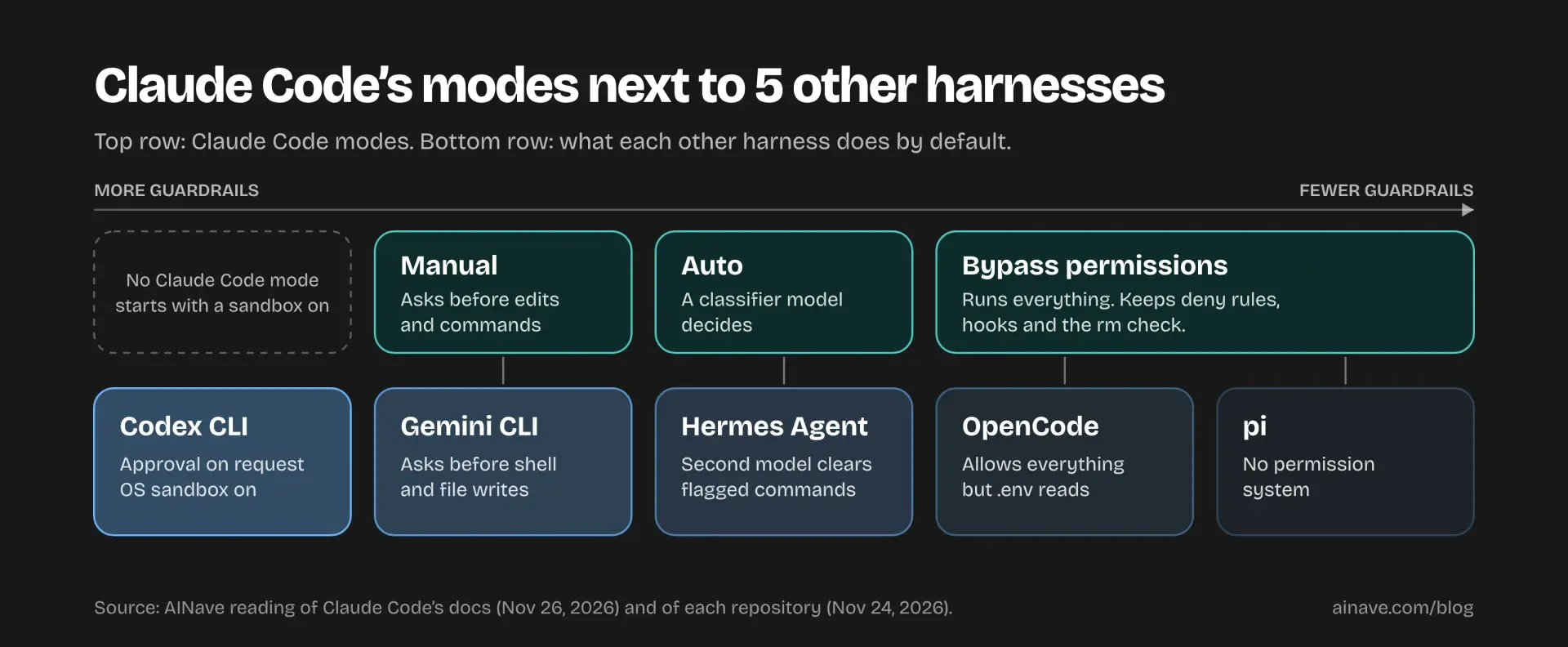
So bypass is not some exotic setting. It is roughly where 2 popular open-source harnesses start.

Things go wrong in every mode
We looked for public reports of Claude Code deleting things it should not. One thing first. These are user reports on GitHub. They are not incidents confirmed by Anthropic.
At least 2 of these 4 were not in bypass. A third does not even name a mode. So the point is, the mode changes how often you are asked. It does not change what the agent can reach.
And approvals carry their own risk. Let's take an example. You click "Don't ask again" for a shell command. That saves a permanent rule to .claude/settings.local.json. Apiiro found credentials leaking to GitHub through Claude Code settings files that way. We covered it in our Nov 12 tech news edition.
What I rely on instead
See, "which mode is safe" is the wrong question. The right question is this. What is the worst thing this agent can do with the access it has?
For my production data, the read-only database users answer that. In any mode, with any bug, Claude cannot change that data. It cannot drop it. Anthropic's enterprise guide from November 2026 gives the same advice in general form. Scope the credentials to the task. Not to everything the developer can reach.
But read-only credentials protect production. They don't protect a laptop. The bypass report above shows that. For local work the answers are plain. Commit often. Give each task its own git worktree. Keep the deny rules from earlier. I run my parallel sessions through Orca, and it puts every session in its own worktree.
Which mode when
- A repo you don't know yet, or work where you want to see every step: Manual or Plan.
- You review the diff anyway and shell commands are the real risk: Accept edits.
- Long tasks on your own machine: Auto. It is the default now. And it is what Anthropic points to in place of bypass.
- Scripts and CI: Don't ask, with allow rules for exactly what the job needs.
- Bypass: Anthropic's answer is containers and VMs only. Mine is narrower than "everywhere" too. I use it where I already know the worst case, because the credentials are read-only and the work is in git.
What older tutorials get wrong
Claude Code's permissions changed a lot in 2026. So if a guide says any of these things, it is out of date.
- "Auto mode is for Team plans" or "needs a flag." It became generally available on July 10, 2026 and is on every plan.
- "Sessions start in default mode." Terminal and VS Code sessions have started in auto since late September 2026.
- "The modes are default, acceptEdits and plan." There are 6, and
defaultis now labeled Manual. - "Bypass will run
rm -rf ~without a word." Recognized critical-path removals now prompt in the terminal. In the desktop app and VS Code they are denied, unless a hook allows them. - "Auto mode eats your usage." Classifier overhead has not counted on Pro, Max, Ultra and Team since August 7, 2026. And by default it is not charged on the API or cloud providers since v2.1.278.
How we did this
Claude Code is closed source. So unlike our harness post, this one rests on documentation. We read Anthropic's docs as they stood on November 26, 2026, the changelog, Anthropic's 2 articles on auto mode and the GitHub issues linked above. We did not re-test each mode for this post. The comparison with other harnesses comes from our own reading of their code on November 24. And we give version numbers wherever the behavior changed, because it changes often.
Sources
- Permission modes, Configure permissions, Sandboxing and changelog, Claude Code documentation, read Nov 26, 2026
- Engineering post on Claude Code auto mode, Anthropic, Mar 25, 2026
- Article on auto mode becoming the default, Anthropic, Aug 7, 2026
- Auto mode launch post, Anthropic, Mar 24, 2026, updated Jul 10, 2026
- Enterprise guide to securing coding agents, Anthropic, Nov 23, 2026
- GitHub issues #10077, #61519, #75859 and #96483 in anthropics/claude-code
- What is an agent harness? We read the source code of 5 to find out, AINave, Nov 25, 2026
Facts last checked: Nov 26, 2026. Claude Code ships changes to permissions almost every week.
Frequently asked questions
What is bypass permissions mode in Claude Code?
It is the mode where Claude Code runs tool calls immediately without asking. Its setting value is bypassPermissions and the CLI flag is --dangerously-skip-permissions. Deny rules, ask rules, PreToolUse hooks that deny and a check on dangerous rm commands still apply. Anthropic recommends it only inside containers or VMs.
Is --dangerously-skip-permissions the same as bypass permissions?
Yes. The flag starts a session in bypassPermissions mode, the same mode you get by picking Bypass permissions in the desktop app or VS Code.
Is Claude Code auto mode safe?
Safer than bypass, but not guaranteed. A classifier model reviews actions other than reads and in-project edits. In Anthropic's own tests it wrongly blocked 0.4% of safe actions and let through 17% of 52 real overeager actions. Anthropic's docs say auto mode does not guarantee safety.
Which permission mode does Claude Code start in?
Interactive terminal and VS Code sessions have started in auto mode since late September 2026 (v2.1.283 and v2.1.284), on every plan, unless an admin has disabled it. Headless claude -p runs and the Agent SDK normally start in Manual. In the desktop app, the mode you pick is remembered per folder.
How do I switch permission modes in Claude Code?
In the terminal, press Shift+Tab to cycle through Manual, Accept edits and Plan, followed by any optional modes that are enabled. In the desktop app and VS Code, use the mode selector. Bypass only appears if the session was started with it enabled.
Show 4 more questions
How do I disable bypass permissions for my team?
Set permissions.disableBypassPermissionsMode to "disable". It works in any settings file, and in managed settings users cannot override it. The matching setting for auto mode is permissions.disableAutoMode.
Can a repository force Claude Code into bypass mode?
No. If a project's .claude/settings.json sets the starting mode to auto or bypassPermissions, Claude Code ignores it. Only your user settings, managed settings or a command-line flag can enable those modes.
Does the sandbox still work in bypass mode?
Partly. If you turned it on, it still limits where shell commands can write. But in bypass mode a retry outside the sandbox runs without a prompt, and connections to hosts off your allowlist are allowed without a prompt. Setting allowUnsandboxedCommands to false and strictAllowlist to true closes both. The sandbox is off by default and covers shell commands only.
Does auto mode use extra tokens?
Each classifier check is an extra model call, but you usually don't pay for it. Since August 7, 2026 the overhead does not count against usage on Pro, Max, Ultra and Team plans. Since v2.1.278, API, Enterprise and cloud-provider sessions default to a server-side classifier that isn't charged either. Overhead is billed only on a fallback to the local classifier.